
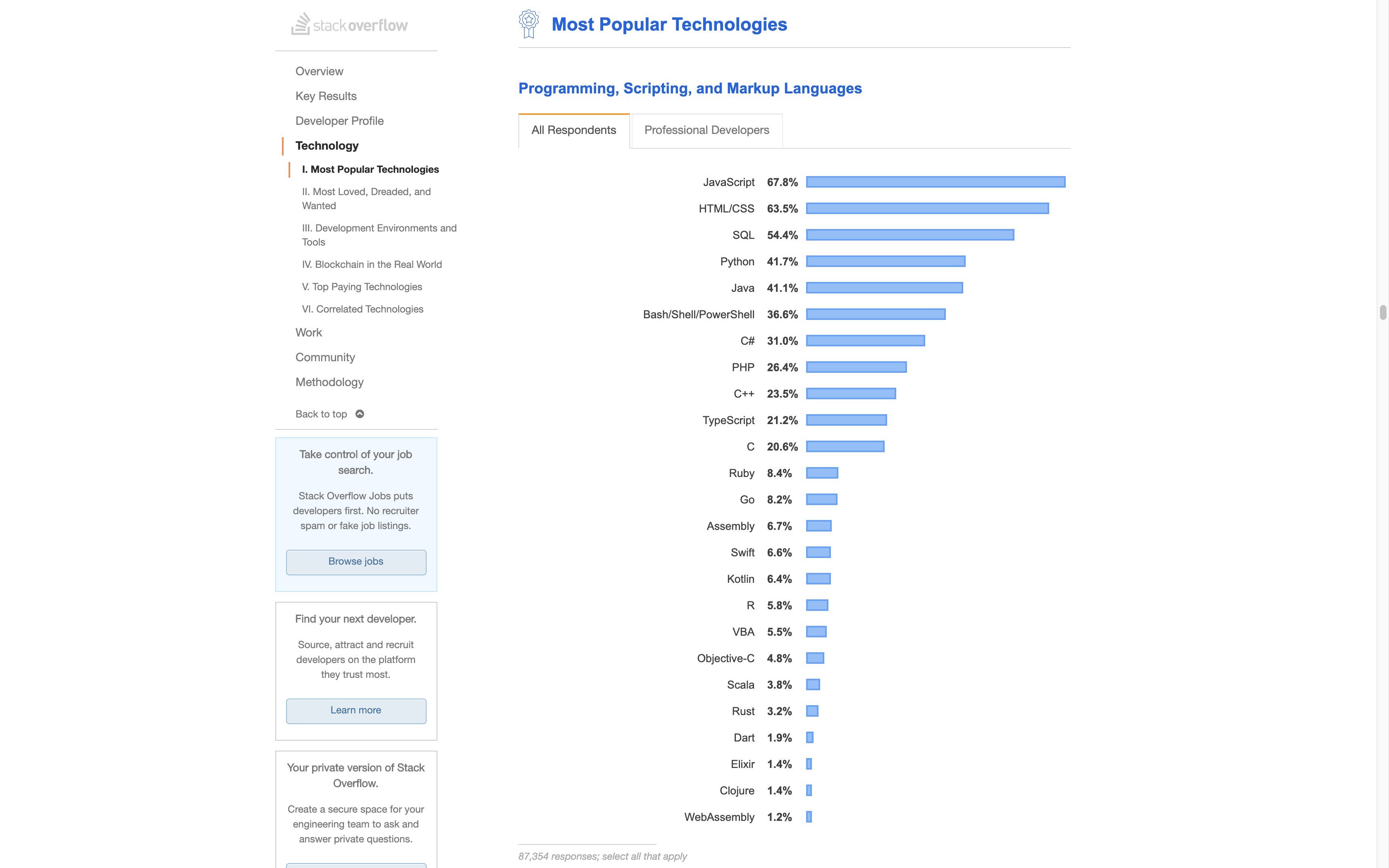
What is Javascript?
The only client-side programming language that executes in the browser
The only client-side programming language that executes in the browser
Add atimeelement inside everytdin the schedule
When I click on this button, validate the form and display errors
When a message arrives, display an OS-level notification popup
Display my 9 latest Instagram posts in the sidebar
 …the functionality of Scheme
 …the object orientation of Self
 …and the syntax of Java

⟨applet code="..."⟩ tag(define (fib n) (if (< n 2) n (+ (fib (- n 1)) (fib (- n 2)))))

I was under marketing orders [from Mark Andreessen] to make it look like Java but not make it too big for its britches … [it] needed to be a silly little brother language.
Brendan Eich (source)
			statement1;
			statement2;
			statement3;
			if (condition) {
			 	statements
			}
			for (init; test; step) {
				statements
			}
			function name(arg1, arg2) {
				return value;
			}
⟨script type="module"⟩
src attribute specifies a url whose contents should be fetched and executedtype="module"
⟨applet⟩ loaded compiled code but JS didn't—why?
null and undefined+ - * / ** %== != > < >= <= && (for and) || (for or)+ - ! (for not)name(arguments)[1, 2, 3, "anything goes"]
			if (condition) {
				statement1;
			}
if (condition) {statement1;}
		             if (condition)
			statement1;
if (condition) statement1;
			if (condition) {
				statement1;
				statement2;
			}
if (condition) {statement1; statement2;}
			if (condition)
				statement1;
				statement2;
if (condition) statement1; statement2;
$('#id')$$('.class')$0 - $4$_
			<script type="module">
			console.log("Hello world", 4 * 2 ** 3 + 10)
			console.log({firstName: "David", lastName: "Karger"})
			</script>
>
				4
				*
				2
					** 3
					+ 10
< 42>
$$("h1, h2, h3")
< [h1,
h2,
h3#general-information, ...]4 * "2" ** 3 + 10* only likes numbers so its arguments get coerced to numbers4 * 2 ** 3 + "10"+ is overloaded: It performs addition and concatenation+ prefers coercing to strings over coercing to numbersslider.step = (slider.max - slider.min)/10
if (new Date() - date < 60000) {
console.log("Less than a minute ago")
}
| Code | Guess the Result |
|---|---|
|
|
|
|
|
|
|
| Code | Result | |
|---|---|---|
| Type conversion |
|
42 |
| Strict equality |
|
false |
| Number parsing |
|
10 |
if() evaluates its argument then coerces it to Booleanfalse when converted to boolean is called "falsy"false, "", 0, NaN, null, undefined are all falsy."0", "false", [] (an empty array) are all truthy.Boolean(value) or, !!value| JS expression | Python expression |
|---|---|
a && b |
a and b |
a || b |
a or b |
a ? b : c |
b if a else c |
"Hello" && 0?&& and || do not always return true/false
if (heading && heading.id) {
// Heading is non-empty and has an id, linkify
heading.innerHTML = `<a href="#${heading.id}">
${heading.textContent}
</a>`;
}
// let declares a variable
let r = 10;
// const declares a constant
const π = Math.PI;
Again, everything so far seems run-of-the-mill…
var. Don't use it, there are many pitfalls with var that let avoids!
let x = "Hello";
x = 1;
console.log(x);
let x;
console.log(x);
undefined?
const π = 3.1415926;
π = 22 / 7;
console.log(π);
const squares = [1, 4, 9, 16];
squares[4] = 25;
console.log(squares);
if (true) {
let x = 1;
}
console.log(x);
let (and const) are block-scoped
if (true) {
let x = 1;
log();
}
function log() {
console.log(x);
}
if (true) {
let x = 1;
log();
}
function log() {
console.log(x);
}
function f()
x = 1;
}
function log() {
console.log(x);
}
f();
log();
var x=10;
letletlet that might act weird⟨script type="module"⟩) become part of the module scope
person = {
age: 34,
name: {
"1st": "Lea",
last: "Verou"
},
height: 170-height(sneaker)
};
person = {
"age": 34,
"name": {
"1st": "Lea",
"last": "Verou"
}
"height": 164;
};
let user = {
name: "Lea Verou",
age: 34
};
let user = {
name: "Lea Verou"
};
user.age = 34;
let user = {};
user["name"] = "Lea Verou";
user["age"] = 34;
let user = {
"name": "Lea Verou",
"age": 34,
"hobbies": ["Coding", "cooking"]
};
delete user.hobbies;
let user = {
name: "Lea Verou",
age: 34
};
console.log(user.hobbies);
undefined
let user = {
name: "Lea Verou",
age: 34
};
user.age = undefined;
console.log(user);
undefined can also be a legit property value. Setting a property to undefined does not delete it.undefined means there is no value naturallynull means something has no value on purpose
let hobbies = ["Coding", "Cooking"];
hobbies.user = "Lea Verou";
console.log(hobbies.length, hobbies.user);
let hobbies = ["Coding", "Cooking"];
hobbies["1"] = "Dining";
console.log(hobbies[1], hobbies["1"]);
let greet = function() {
console.log(`Hi, I’m ${this.name}`);
};
let instructors = [
{name: "Lea", greet: greet},
{name: "David", greet: greet}
];
for (let instructor of instructors) {
instructor.greet();
}
" Hello! ".trim() // "Hello!"thiswindow global variable
window.innerHeight tells you its height
window.close()window (so window.window=window)
<!DOCTYPE html>
<html>
<head><title>Hello world</title></head>
<body><p>Hello <em>world</em> 👋</p></body>
</html>
Document:
This is the root node, and does not correspond to any HTML element.HTMLElement:
Every HTML element, such as html, body, or em
is of this type. Usually, they merely inherit from HTMLElement,
and are an instance of a more specific type such as
HTMLHtmlElement,
HTMLBodyElement and so on.Text:
Text nodes, such as "Hello ", "world", and "!" in our example.
These never contain any other element, they are always leaves.
Comment:
HTML comments (<!-- like this -->) are represented by objects of this type.
>
				$$("h1, h2, h3")
< [h1,
				h2,
h3#general-information, ...]window is a global variable holding an object that represents the windowwindow has properties like document and methods like close()window becomes a global variable!
				window: {
				  innerHeight: /* height of window in pixels */,
				  close: function () {
				    /* closes window if invoked */ },
				  …
				  document: { /* object representing document */
				    title: /* title of document */
				    location: /* url of document */
				    head:  /* HTMLElement representing head*/,
				    body: /* HTMLElement representing body*/
				    …
				  }
				}
<button id="submit">Submit</button>
console.log(submit, window['submit']);
				let selector = "h1, h2, h3, h4, h5, h6";

				// Get all headings in the current document
				let headings = document.querySelectorAll(selector)
				// Get the first heading in the current document
				let firstHeading = document.querySelector(selector)
Classic C-style
Low level, trades readability for power
|
|
|---|---|
Iterate over object properties
|
|
Iterate over iterable objects like arrays
|
|
Hint: element.remove() removes an element from the DOM
style elements. What remains?
element.remove();
parentElement.textContent = "";parentElement.innerHTML = "";NaN instead of throwing math errorsundefined(123).toString()) worksuse strict; at start of code makes it picky, helps catch errors
 DOM API
 Fetch API