JavaScript Is Single-Threaded
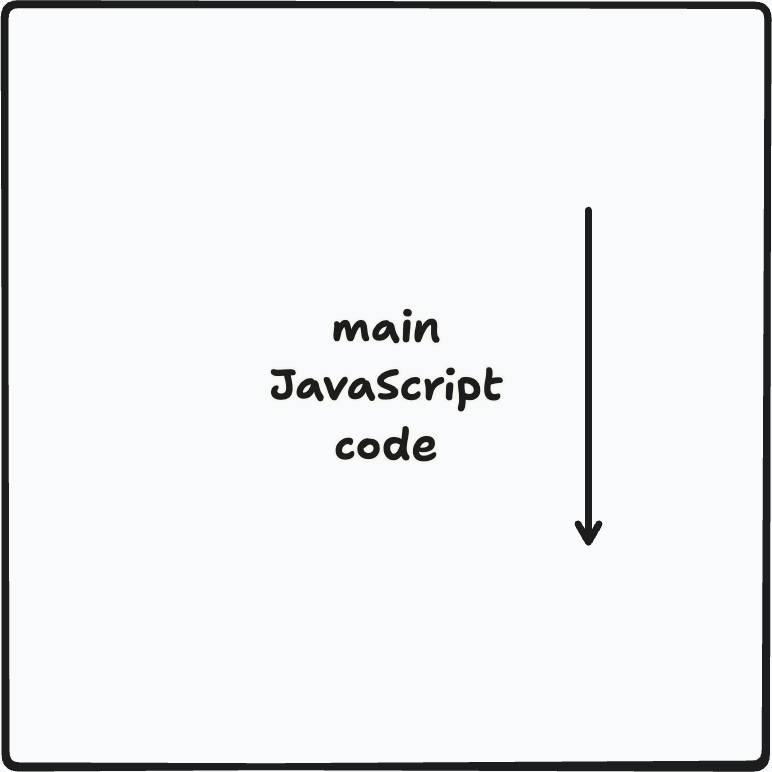
Normal JavaScript code only executes on a single thread. That means the lines of code execute one at a time.
Normal JavaScript code only executes on a single thread. That means the lines of code execute one at a time.
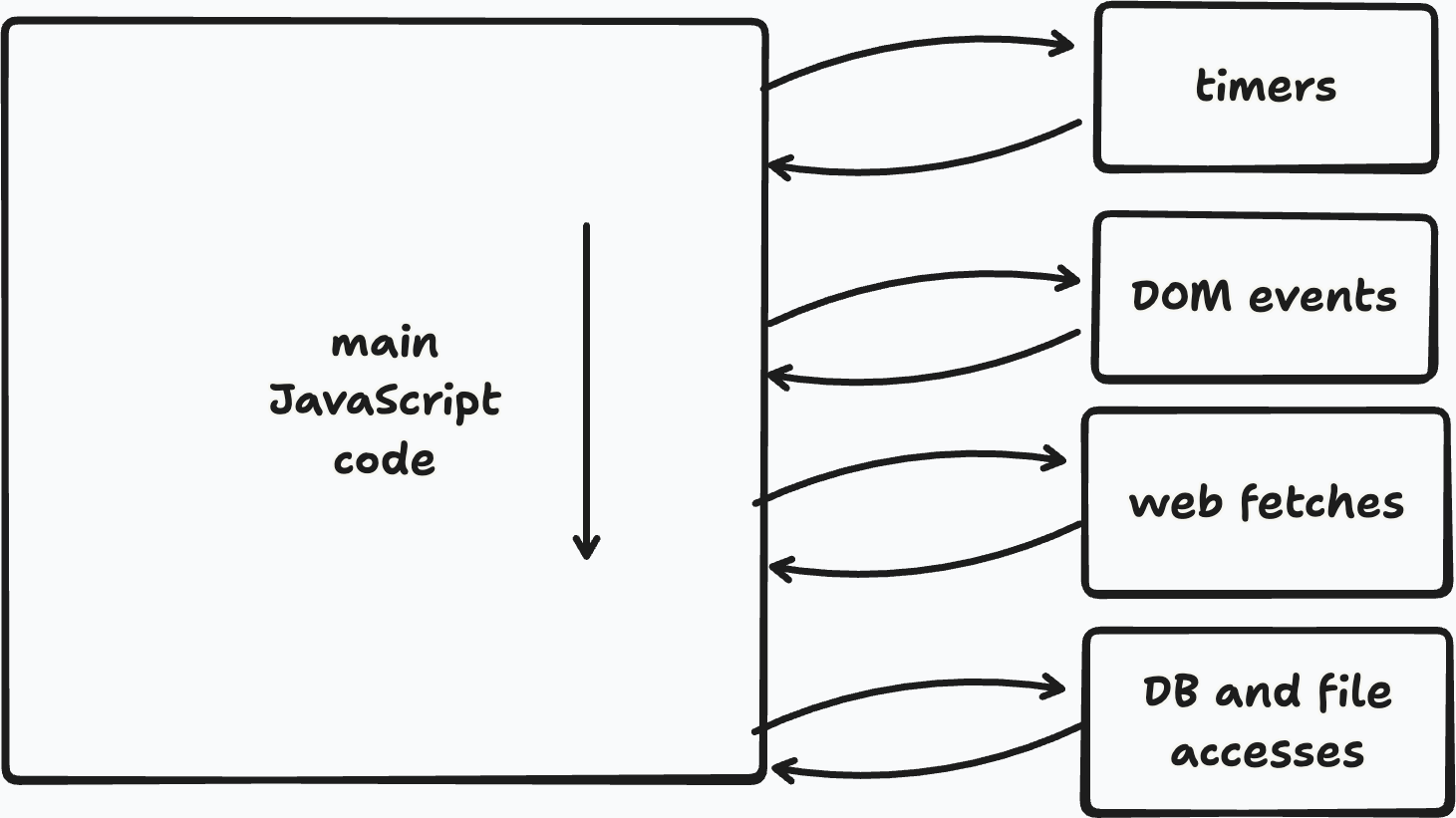
We'll see in an upcoming lecture how reactive programming can help mitigate some of these downsides.
init().
			  let img=document.createElement('img');

			  //setting src triggers load
			  img.src='https://pictures.com/mine.jpg'
			  while (!img.complete) {
			  // twiddle my thumbs
			  }

			  init();
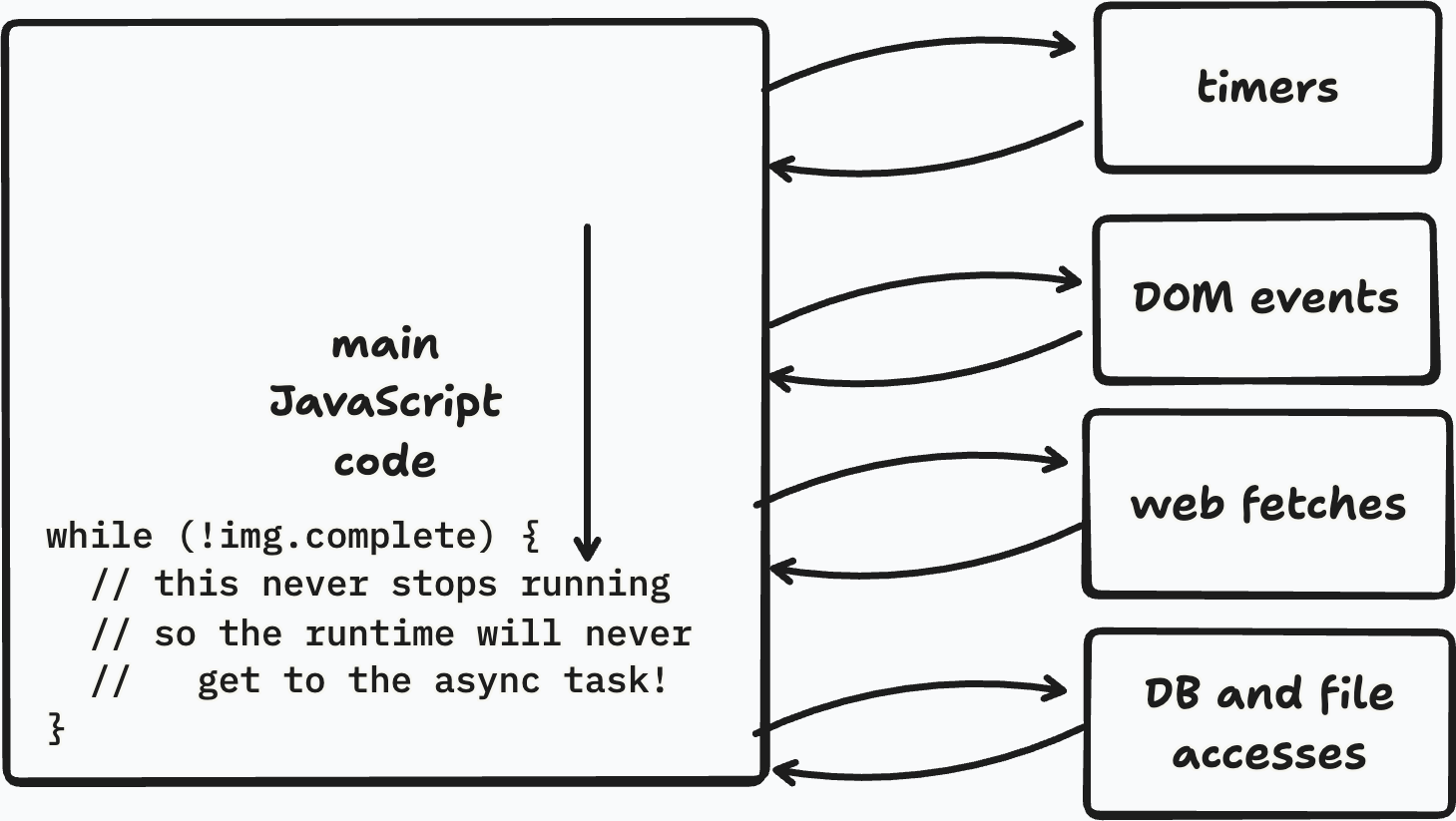
The main thread never finishes executing that while loop, so the asynchronous image load stays blocked too.
setInterval()
			  let img = document.createElement('img');

			  img.src = 'https://pictures.com/mine.jpg';

			  let pollId = setInterval(() => {
			    if (img.complete) {
			      init();
			    }
			  }, 250);

			  doOtherStuff();
while loopinit()clearInterval()
			  let img = document.createElement('img');

			  img.src = 'https://pictures.com/mine.jpg';

			  let pollId = setInterval(() => {
			    if (img.complete) {
			      clearInterval(pollId);
			      init();
			    }
			  }, 250);

			  doOtherStuff();
clearInterval() stops future polling once condition is metinit() only runs onceAddEventListenerRemoveEventListenerclearTimeout and clearInterval for timers)init().
			  let img=document.createElement('img');

			  img.addEventListener('load',init);
			  img.src='https://pictures.com/mine.jpg'

			  doOtherStuff(); //runs during img load
load event is triggered when item finishes loading
			  let img=document.createElement('img');

			  img.src='https://pictures.com/mine.jpg'
			  img.addEventListener('load',init);

			  doOtherStuff(); //runs during img load
setInterval(() => {
  button.textContent = ++i;
}, 500);

img.addEventListener('load', () => {
  init();
});Let's say I'm building a social media app, and I have a database of users. I want to check whether my best friend's best friend is me or not!
Looking up a user in the database is an async API query.
function getUser(userId, callback) { ... }And to do this lookup we'll need to make several async requests.
getUser("jopo", user => {
  getUser(user.bestFriendId, friend => {
    getUser(friend.bestFriendId, friendOfFriend => {
      console.log(friendOfFriend.name);
    });
  });
});getUser("jopo", user => {
getUser(user.bestFriendId, friend => {
getUser(friend.bestFriendId, friendOfFriend => {
console.log(friendOfFriend.name);
});
});
});getUser("jopo", user => { getUser(user.bestFriendId, friend => { getUser(friend.bestFriendId, friendOfFriend => { console.log(friendOfFriend.name); }); }); });
If we reformat our code slightly differently, we can begin to see a linear chaining pattern that could maybe replace the nesting structure.
			  getUser("jopo") //returns a promise
			  .then(user => getUser(user.bestFriendId))
			  .then(friend => getUser(friend.bestFriendId))
			  .then(friendOfFriend => {
		    console.log(friendOfFriend.name);
			  });
then() method to specify what to do when promise is fulfilled
then()
			  function getUserPromise (userId) {
			      return new Promise(fulfiller => {
			          getUser(userId, fulfiller);
			      });
			  }

			  getUserPromise("jopo")
			  .then(user => console.log(user.name));
then(f) says f is a callback to invoke when promise is fulfilledf receives value of fulfilled promise
			  p = delayed("hi",1000);
			  // promise resolves to "hi"
			  // after 1000ms

			  p.then(res => console.log(res));
			  // console outputs 1000ms later
			  ...lots of code
			  p.then(res => console.log("bye"));
			  // if p already fulfilled,
			  // callback executes immediately
			wait(1000)	//promise fulfilled after 1000ms
			.then(() => console.log(1))
			.then(() => console.log(2))
			.then(() => console.log(3))
			wait(1000)	//promise fulfilled after 1000ms
			.then(() => console.log(1))
			.then(console.log(2))
			.then(() => console.log(3))
then() callback can return a value (or a promise of one)then() callback in chain when availablethen() returns a new promise p providing that valuethen() is invoked on pp.then() passes on the value of p
			  //traditional evaluation style
			  y = f(g(h(x)));

			  //promise-based
			  Promise.resolve(x)
			  // promise with fulfilled value x
			  .then(h) //h receives x
			  .then(g) //g receives h(x)
			  .then(f) //f receives g(h(x))
			  .then(res => y=res);
.then() always returns a promise
then() returns thatthen() wraps it in a (already fulfilled) promisethen() returns a promise wrapping undefined
then() in chain invoked on new promisePromise.all() tracks multiple promises running in parallel
			  let p1=fetch(url1);
			  let p2=fetch(url2);
			  let p3=fetch(url3);
			  Promise.all([p1,p2,p3])
			  .then([c1,c2,c3] =>
			  {//process all 3 pieces},
			  err => {handle the error})
then() callbackthen() can take a second callback
then()
			  fetch(url)
			  //returns a promise to provide
			  //   content found at that url
			  .then(content => {
			    //executes if fetch is fulfilled
			    console.log("received" + content);
			    return 0},
			  error => {
			    //executes if fetch is rejected
			    console.log("error: " + error)
			    return -1}
			  })
			  .then(res => console.log(res))
			  //logs 0 if fetch succeeded,
			  //     1 if it failed
.then(f,r) callbacks for when promise resolves
f() invoked if promise fulfilledr() invoked if promise rejectedundefinedp.catch(c): callback c() invoked if promise p is rejected; fulfilled p passed on without change
then(), catch() returns a new promise that can fulfill or rejectp.catch(foo) same as p.then((x)=>x, foo)p.finally(c): callback c() is invoked when promise p is fulfilled or rejectedPromise.race([a,b,c,...]): returns a promise that fulfills as soon as any of a,b,c... doPromise.resolve(x): returns a promise that is already resolved to x
Promise.reject(): returns a promise that is already rejected
getUser("jopo") //returns a promise
.then(user => getUser(user.bestFriendId))
.then(friend => getUser(friend.bestFriendId))
.then(friendOfFriend => {
  console.log(friendOfFriend.name);
});
user at the end?then chains and arrow functions.
async function showFriendOfFriend() {
  const user = await getUser("jopo");
  const friend = await getUser(user.bestFriendId);
  const friendOfFriend =
    await getUser(friend.bestFriendId);
  console.log(user, friendOfFriend.name);
}
async/await uses async functions that return Promisesawait gives us a value (e.g. user is a raw value, not a promise)user can be used downstream anywhere!await pauses the async function without blocking the main threadawait in loops!
for (let i=1; i<=5; i++) {
  let result =
    await delayed('answer',5000);
  console.log(i + result);
}then
This is the model from earlier in the lecture: JavaScript code runs on the main thread, and asynchronous systems at the edges signal back when something finishes or when input arrives.
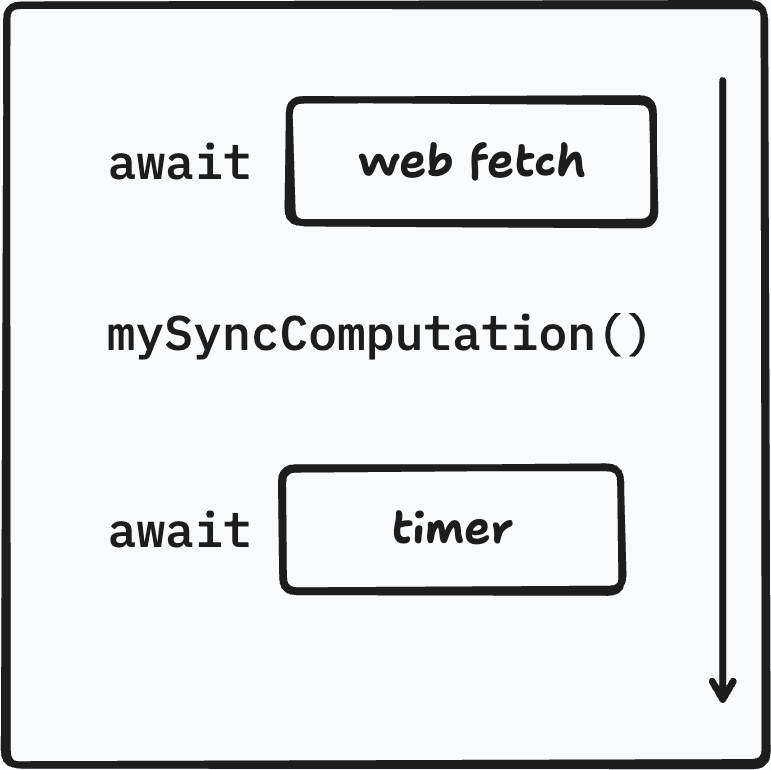
The async/await solution is to push all the async events into our synchronous code.
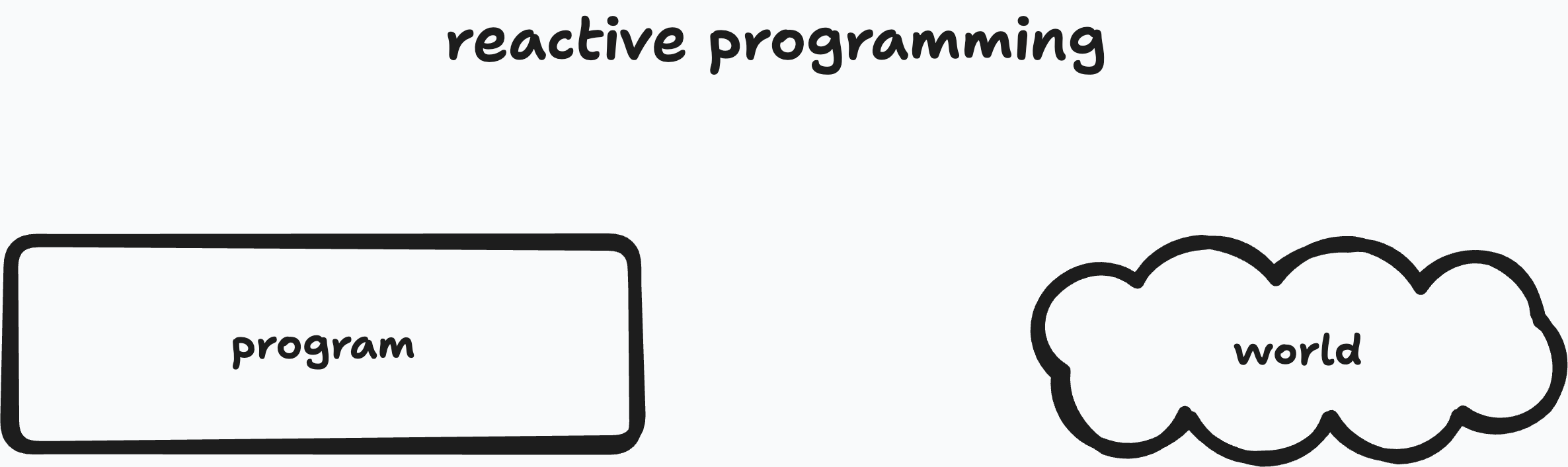
Reactive programming separates our code into a synchronous program piece and an async outside world that sends us information.
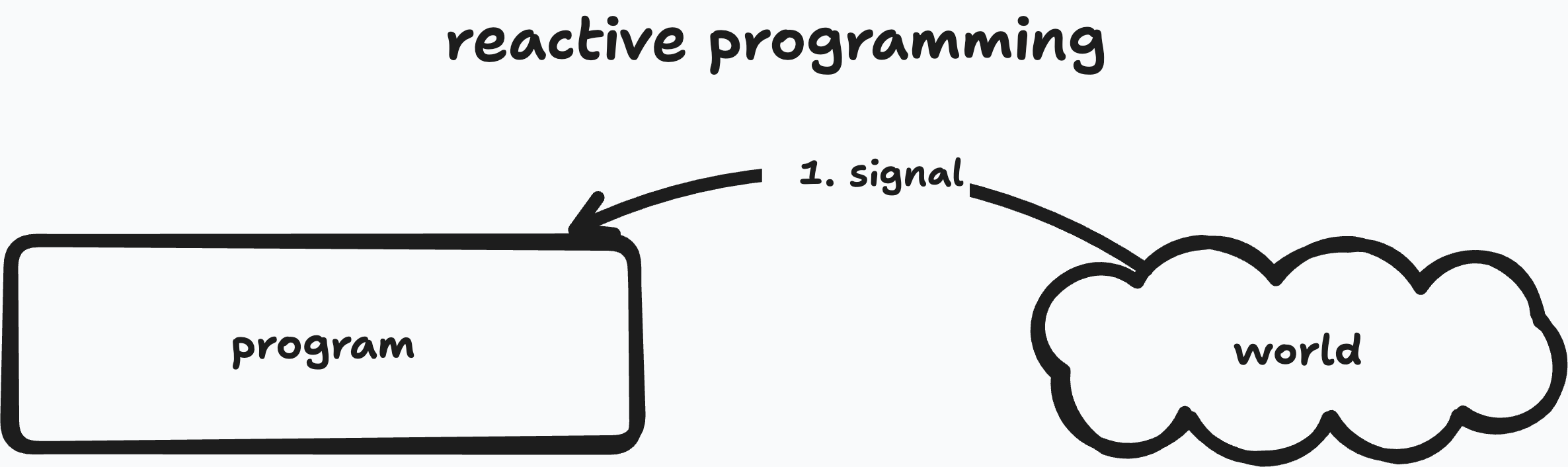
Reactive programming separates our code into a synchronous program piece and an async outside world that sends us information.
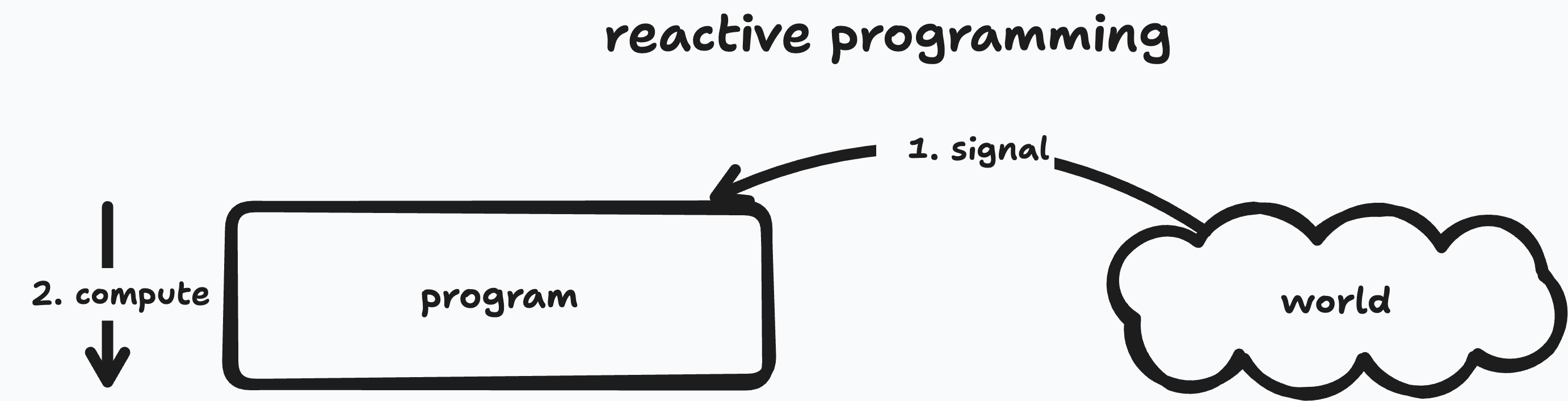
Reactive programming separates our code into a synchronous program piece and an async outside world that sends us information.
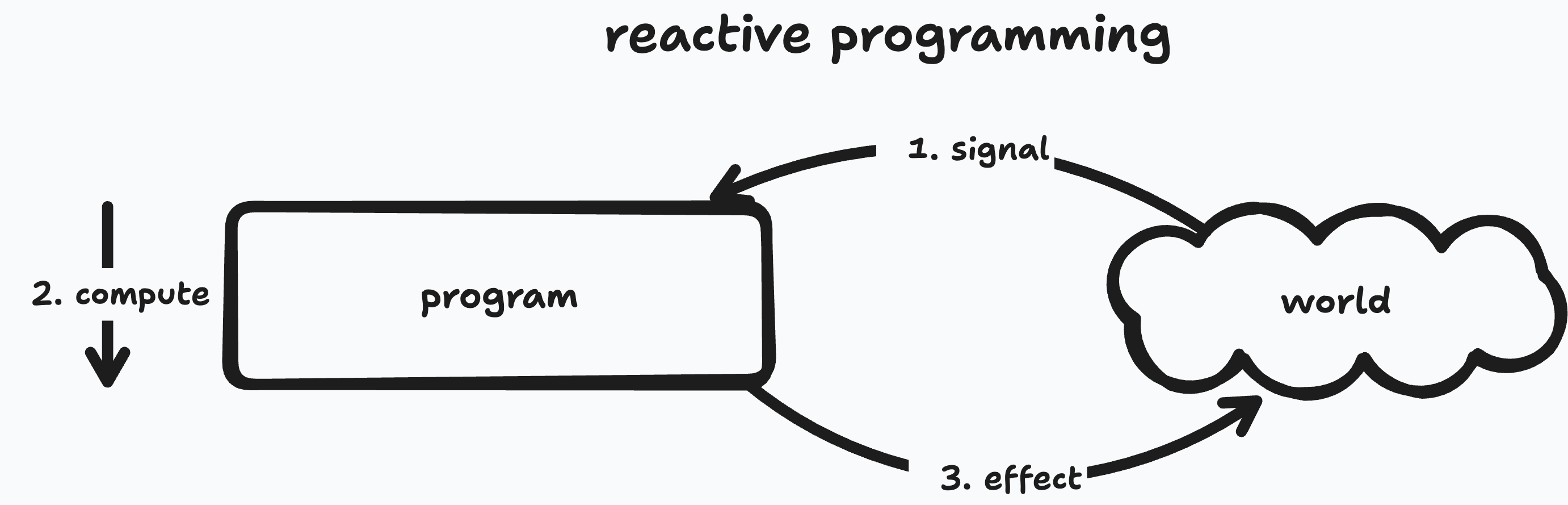
Reactive programming separates our code into a synchronous program piece and an async outside world that sends us information.
async/awaitSignals are the modern way to implement reactive programming systems
import { createApp } from "vue";

createApp({
  template: "#template",
  data() {
    return {
      price: 5,
      quantity: 2
    }
  },
  computed: {
    total() {
      return this.price * this.quantity
    }
  }
}).mount("#app")
import { createApp, ref, computed } from "vue"

function setup() {
  const price = ref(5)
  const quantity = ref(2)

  const total = computed(() => {
    return price.value * quantity.value
  })

  return { price, quantity, total }
}

createApp({
  template: "#template",
  setup
}).mount("#app")
We'll use Composition API for reactivity because it exposes the reactive pieces directly and is more flexible. Prompt your AI to use it too.
The Composition API also makes reactive programs look more like conventional programs, similar to how async/await programs look kind of like conventional programs.
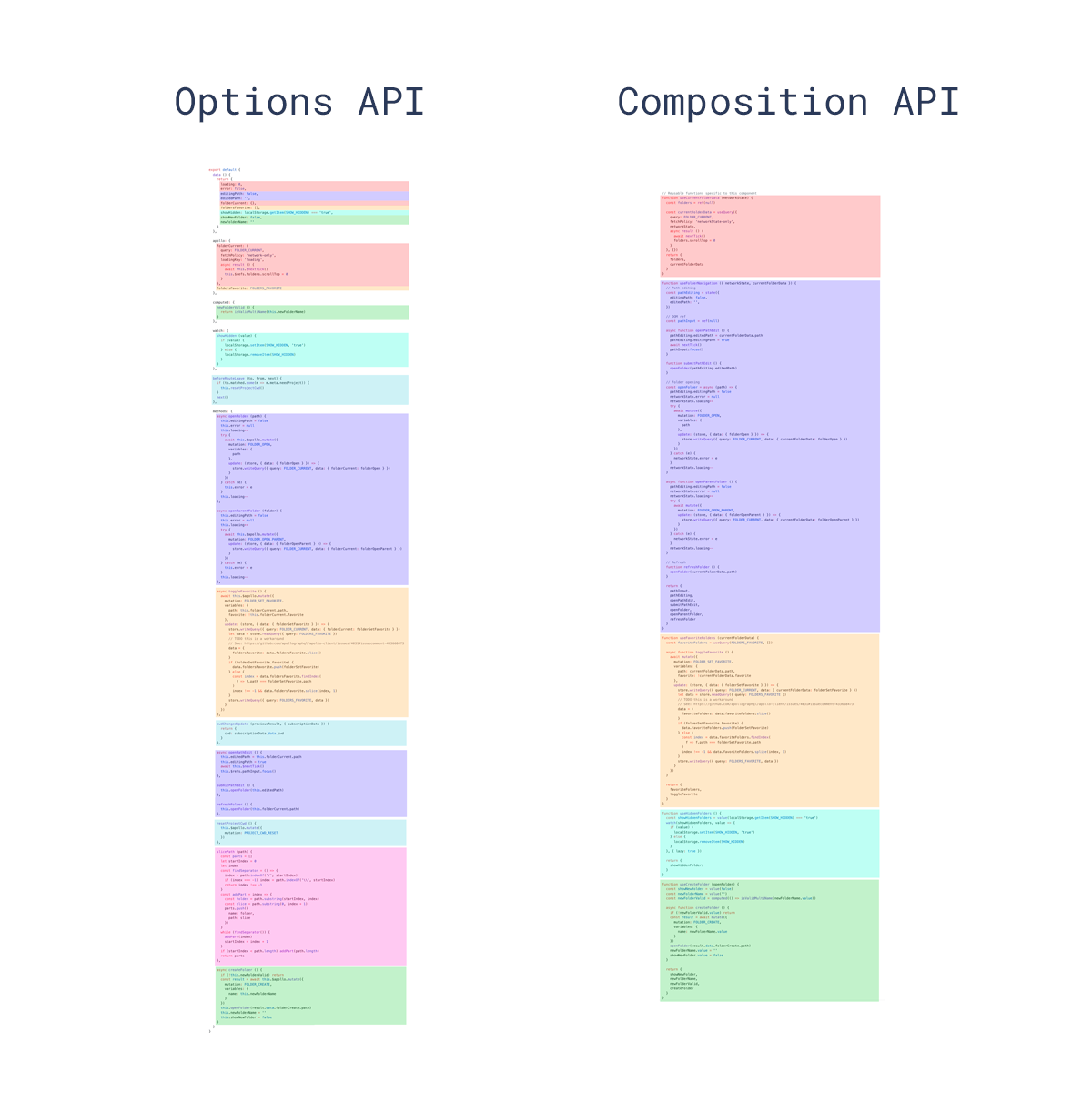
The Options API separates concerns by reactive primitive whereas the Composition API lets you group things by purpose.
const price = ref(5)
const quantity = ref(2)

const total = computed(() =>
  price.value * quantity.value)

watchEffect(() => {
  document.title =
    `Total: ${total.value}`
})
ref() in Vue
computed() in Vue
watchEffect() in Vue
ref and computed feel a little bit like await in that they allow us to use normal JavaScript programming constructs to manipulate code with special semantics. Values and computations behave differently from normal JavaScript ones.
const count = ref(0)

<template>
  <p>Count: {{ count }}</p>
</template>

// framework implementation
watchEffect(() => {
  paragraph.textContent =
    `Count: ${count.value}`
})
watchEffect() attached to the rendered outputwatch()watch() is a more targeted cousin of watchEffect()watchEffect() tracks whatever reactive values you read inside itwatch() lets you specify exactly what source to watch
const query = ref('')

watch(query, (newQuery, oldQuery) => {
  console.log('changed from',
    oldQuery, 'to', newQuery)
  fetchResults(newQuery)
})
watch/watchEffectcomputed() instead
const state = ref({
  todos: [ "Create slides", "Release HW" ],
  total: 0
})

// plausible, but dangerous:
// "keep total in sync with todos"
watchEffect(() => {
  state.value.total =
    state.value.todos.length
})

// better: derived state is a computation
const total = computed(() => {
  return state.value.todos.length
})

// use total.value when needed
ref()v-for, give each item a stable :key
// setup
const scores = ref({
  ada: 10,
  grace: 12
})

const todos = ref([
  { id: 1, text: 'Sketch', done: false },
  { id: 2, text: 'Prototype', done: true }
])

scores.value.ada++
todos.value.push({
  id: 3, text: 'Ship', done: false
})

// template
<li v-for="todo in todos" :key="todo.id">
  {{ todo.text }}
</li>
{{ count }}, not {{ count.value }}.value
const count = ref(0)
const doubled = computed(() =>
  count.value * 2)

// template
{{ count + 1 }}
{{ doubled }}

// JavaScript
count.value++
ref()
const count = ref(0)

count.subscribe(() =>
  console.log(count.value))

count.value++

// logs: 1
function ref(initial) {
  let value = initial
  let subs = new Set()

  return {
    subscribe(reaction) {
      subs.add(reaction)
    },

    get value() {
      return value
    },

    set value(newValue) {
      if (newValue === value) return
      value = newValue
      for (let sub of subs) {
        sub()
      }
    }
  }
}
This is the smallest useful signal model.
A ref stores a value and calls subscribed observers whenever that value changes.
There is no separate watch abstraction yet. Subscribers are just plain functions.
Problem: a subscriber can only depend on one signal.
const first = ref("jo")
const last = ref("po")

watch([first, last], () => {
  console.log(
    first.value + last.value)
})

first.value = "th" // "thpo"
last.value = "eia" // "theia"
function watch(deps, fn) {
  for (let dep of deps) {
    dep.subscribe(fn)
  }
}
Problem: We want to subscribe to just (and only just) the dependencies we actually use!
And ideally we shouldn't have to see the dependency list at all.
We can introduce a new function, watch, that will take an explicit dependency list and subscribe to all of them.
const first = ref("jo")
const last = ref("po")

watchEffect(() => {
  console.log(
    first.value + last.value)
})

first.value = "th" // "thpo"
last.value = "eia" // "theia"
Intuition: When a running effect reads a signal, we should automatically track it as a dependency!
let currEffect

function ref(initial) {
  let value = initial
  let subs = new Set()

  return {
    subscribe(reaction) {
      subs.add(reaction)
    },
    get value() {
      return value
    },
    set value(newValue) {
      if (newValue === value) return
      value = newValue
      for (let sub of subs) {
        sub()
      }
    }
  }
}
function watchEffect(fn) {
}
To automatically add dependencies, instead of having the effect itself subscribe to the signal, we'll have the signals trigger autosubscription. We do this by tracking the current effect where the signal is read and then subscribing the current effect to the signal. Finally, we now have to execute the effect immediately so we can autosubscribe. Otherwise we wouldn't be tracking anything!
let currEffect

function ref(initial) {
  let value = initial
  let subs = new Set()

  return {
    subscribe(reaction) {
      subs.add(reaction)
    },
    get value() {
      return value
    },
    set value(newValue) {
      if (newValue === value) return
      value = newValue
      for (let sub of subs) {
        sub()
      }
    }
  }
}
function watchEffect(fn) {
  const execute = () => {
    const prevEffect = currEffect
    currEffect = fn
    try {
      fn()
    } finally {
      currEffect = prevEffect
    }
  }
}
To automatically add dependencies, instead of having the effect itself subscribe to the signal, we'll have the signals trigger autosubscription. We do this by tracking the current effect where the signal is read and then subscribing the current effect to the signal. Finally, we now have to execute the effect immediately so we can autosubscribe. Otherwise we wouldn't be tracking anything!
let currEffect

function ref(initial) {
  let value = initial
  let subs = new Set()

  return {
    subscribe(reaction) {
      subs.add(reaction)
    },
    get value() {
      if (currEffect) {
        subs.add(currEffect)
      }
      return value
    },
    set value(newValue) {
      if (newValue === value) return
      value = newValue
      for (let sub of subs) {
        sub()
      }
    }
  }
}
function watchEffect(fn) {
  const execute = () => {
    const prevEffect = currEffect
    currEffect = fn
    try {
      fn()
    } finally {
      currEffect = prevEffect
    }
  }
}
To automatically add dependencies, instead of having the effect itself subscribe to the signal, we'll have the signals trigger autosubscription. We do this by tracking the current effect where the signal is read and then subscribing the current effect to the signal. Finally, we now have to execute the effect immediately so we can autosubscribe. Otherwise we wouldn't be tracking anything!
let currEffect

function ref(initial) {
  let value = initial
  let subs = new Set()

  return {
    subscribe(reaction) {
      subs.add(reaction)
    },
    get value() {
      if (currEffect) {
        subs.add(currEffect)
      }
      return value
    },
    set value(newValue) {
      if (newValue === value) return
      value = newValue
      for (let sub of subs) {
        sub()
      }
    }
  }
}
function watchEffect(fn) {
  const execute = () => {
    const prevEffect = currEffect
    currEffect = fn
    try {
      fn()
    } finally {
      currEffect = prevEffect
    }
  }

  execute()
}
To automatically add dependencies, instead of having the effect itself subscribe to the signal, we'll have the signals trigger autosubscription. We do this by tracking the current effect where the signal is read and then subscribing the current effect to the signal. Finally, we now have to execute the effect immediately so we can autosubscribe. Otherwise we wouldn't be tracking anything!
let currEffect

function ref(initial) {
  let value = initial
  let subs = new Set()

  return {
    subscribe(reaction) {
      subs.add(reaction)
    },
    get value() {
      if (currEffect) {
        subs.add(currEffect)
      }
      return value
    },
    set value(newValue) {
      if (newValue === value) return
      value = newValue
      for (let sub of subs) {
        sub()
      }
    }
  }
}
function watchEffect(fn) {
  const execute = () => {
    const prevEffect = currEffect
    currEffect = fn
    try {
      fn()
    } finally {
      currEffect = prevEffect
    }
  }

  execute()
}
To automatically add dependencies, instead of having the effect itself subscribe to the signal, we'll have the signals trigger autosubscription. We do this by tracking the current effect where the signal is read and then subscribing the current effect to the signal. Finally, we now have to execute the effect immediately so we can autosubscribe. Otherwise we wouldn't be tracking anything!
computed
const first = ref("jo")
const last = ref("po")

const full = computed(() =>
  first.value + last.value)

watchEffect(() => {
  console.log(full.value)
})

first.value = "th" // "thpo"
last.value = "eia" // "theia"
function computed(fn) {
  const cachedValue = ref()
  watchEffect(() => cachedValue.value = fn())
  return cachedValue
}
We'll create a ref, cachedValue, that will store the output of the function. Then we'll create a watchEffect that updates this cached value. Because it calls fn, it depends on any signals that fn reads!
function ref(initial) {
  let value = initial
  let subs = new Set()

  return {
    subscribe(reaction) {
      subs.add(reaction)
    },
    get value() {
      if (currEffect) {
        subs.add(currEffect)
      }
      return value
    },
    set value(newValue) {
      if (newValue === value) return
      value = newValue
      for (let sub of subs) {
        sub()
      }
    }
  }
}
function watch(deps, fn) {
  for (let dep of deps) {
    dep.subscribe(fn)
  }
}
let currEffect

function watchEffect(fn) {
  const execute = () => {
    const prevEffect = currEffect
    currEffect = fn
    try {
      fn()
    } finally {
      currEffect = prevEffect
    }
  }

  execute()
}
function computed(fn) {
  const cachedValue = ref()
  watchEffect(() => cachedValue.value = fn())
  return cachedValue
}
"thpo" where some, but not all, updates have happenedA general purpose backend for building social software.

			{
				value: {
					content: "Hi Josh! 👋",
					myCoolProperty: {
						foo: "bar"
					},
				},
				actor: "did:plc:numtqzbw74lmrguyvpzq6uf5",
				allowed: ["did:plc:vaw4t3tn7qqc6iyt5lrgvy6t"],
				url: "graffiti:...",
				channels: ["designftw", "did:plc:vaw4t3tn7qqc6iyt5lrgvy6t"],
			}
values
			{
				content: "Party! Saturday at 8pm",
				published: Date.now(),
			}
values: Event
			{
				content: "Party! Saturday at 8pm",
				published: Date.now(),
				location: "77 Mass Ave, Cambridge, MA",
				startTime: new Date(2025, 4, 19, 20).getTime(),
				attachment: [
					{
					    type: "image",
					    url: "graffiti...",
						alt: "A fun party flyer that reads..."
					}
				]
			}
values: Reply
			{
				content: "This is cool!",
				inReplyTo: "graffiti:..."
			}
values: Profile
			{
				name: "Theia",
				pronouns: "she/her",
				icon: {
					type: "image",
					url: "graffiti...",
					alt: "A picture of Theia"
				},
				describes: "did:plc:numtqzbw74lmrguyvpzq6uf5"
			}
values: Add to Group chat
			{
				// Add Theia to the group chat
			    activity: "Add",
			    object: "did:plc:numtqzbw74lmrguyvpzq6uf5",
				target: "cool-group-chat",
			}
post(partialObject, session)
delete(objectOrUrl, session)
get(objectOrUrl, schema, session)
...but you can create arbitrarily complex interactions with objects.
			{
			    activity: "Delete",
			    object: "graffiti:...",
			}
Example
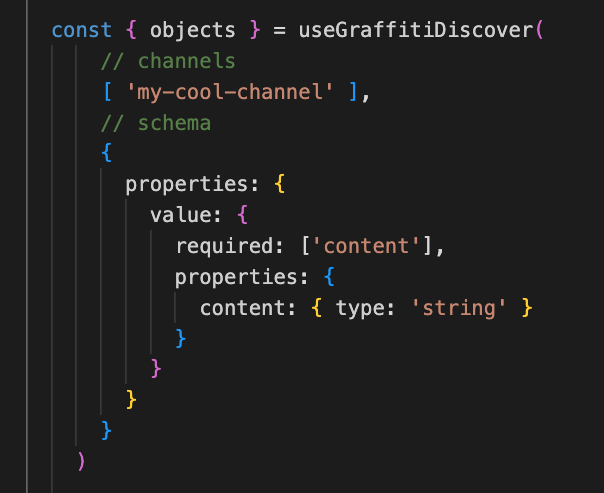
To prevent acidentally getting objects meant for other chats, applications, etc.
They define the context the object is in.
{ channels: ["designftw"] }
For representing a very specific topic.
{ channels: [session.actor] }
{ channels: [object.url] }
Replies, reactions, bookmarks, etc. related to an object. Can create "threaded" replies.
{ channels: [random()] }
For representing user-defined contexts like group chats, etc.
{
  channels: ["isbn:0-486-27557-4"]
}
{
  channels: ["zip:02144"]
}
For representing books, movies, websites, physical places, etc.
Whatever helps you organize objects into meaningful groups.
Anyone can see it (if they query the right channel)
		{
			value: { content: "Hello, world" },
			actor: "did:plc:numtqzbw74lmrguyvpzq6uf5",
			url: "graffiti:...",
			channels: ["designftw"],
		}
Only you can see the object. Useful for:
		{
			value: { content: "Hello, me" },
			actor: "did:plc:numtqzbw74lmrguyvpzq6uf5",
			url: "graffiti:...",
			channels: ["designftw"],
			allowed: [],
		}
Only the actors listed can see the object. Useful for:
		{
			value: { content: "Hello, friend" },
			actor: "did:plc:numtqzbw74lmrguyvpzq6uf5",
			url: "graffiti:...",
			channels: ["designftw"],
			allowed: ["did:plc:vaw4t3tn7qqc6iyt5lrgvy6t"],
		}